Gen-Z Caregiver Ride-Share Accessibility
UX/UI Case Study | Accessibility Design, Voice Interaction, Inclusive Prototyping
The Problem
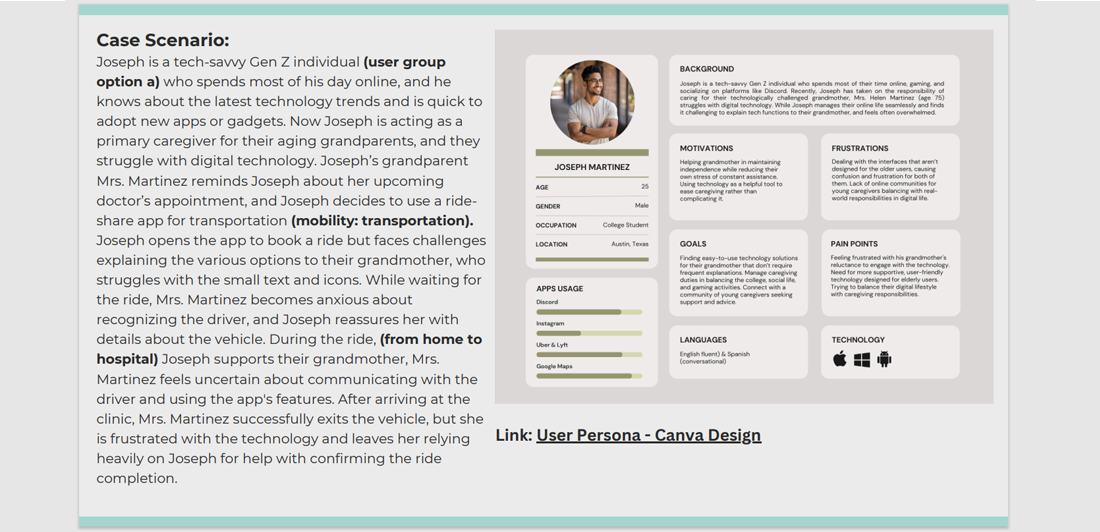
Picture this: Joseph loves tech. His grandmother, not so much. When he tries to help her book a ride to the doctor using a ride-share app, they both hit a wall - tiny text, confusing buttons, and no voice help. She gets anxious; he feels like a tech support hotline. The very tool meant to help was pushing them apart.
My Role & Responsibilities
- UX/UI Designer
- Interaction Designer
- Prototyper
Led research, journey mapping, and interface redesign focused on elderly users and their caregivers.
Design Process
User Research & Insights
I spent time in understanding two sides of the same story:
- Joseph, the Gen-Z caregiver who’s always online but struggling to translate tech to his grandma
- His grandmother, who just wants to get to the doctor without feeling lost or like a burden
Key takeways: It wasn’t just about bigger buttons. It was about trust, clarity, and giving both of them peace of mind.
Journey Mapping & Ideation
I mapped out their whole trip - from "We need a ride" to
"We made it." Along the way, I spotted moments of worry:
"Is this the right car?"
"Did the ride end? Do I need to do
something?"
What if the app could speak to her?
What if
it reassured instead of confused?
Key Design Solutions:
1. Simplified & Accessible Interface
I designed with her eyes in mind:
- Text you can actually read
- Buttons you can't miss
- Colors that stand out gently
- One clear step at a time
2. Voice Command Integration
I gave her a voice - literally.
She can now just say: "Book a ride to my doctor"
And the app talks back: "Your driver Maria is 2 minutes away in a blue Honda."
3. Enhanced Trip Assurance Features
No more squinting at license plates.
A big, friendly photo of the driver + car details shows up.
Joseph gets updates too, so he can relax.
4. Caregiver Support Mode
Joseph can pre-set her favorite places, pay ahead, and toggle on "Grandparent Mode" - a simpler, calmer version of the app, just for her.
Interactive Prototype
Since this was a concept project focused on research and system thinking, I focused on mapping the experience and designing the framework-rather than a high-fidelity prototype.
You can explore the foundational work here:
- User persona of Joseph - fears, habits, and tech comfort level.
- Emotional journey map showing the highs and lows of her ride-share experience.
- Clear opportunities for voice support, visual simplicity, and caregiver collaboration.
Accessibility Considerations
- Colors that are easy on the eyes, chosen for clarity and calm, not just style.
- Text that can grow larger with a simple setting, because reading shouldn't be a struggle.
- Voice-first interactions so she can keep her eyes up and her hands free.
- Audible notifications that cut through household noise - clear, kind, and impossible to miss.
Tools Used
- Figma - to create detailed journey map that visualized emotional and practical ride experience.
- Canva - to create User Persona with empathy and clarity.
- Google Assistant - inspiration for voice-first and hands-free interaction designs.