CBAY DVR iOS App
UI/UX Design Case Study | Visual Design, User Interface, iOS App Design
The Problem
Voice recording apps for professionals - like clinicians, and students - were often either too simple (lacking security and editing tools) or overly complex (buried under menus and settings). Users needed a secure, high-quality recording tool that felt intuitive and trustworthy, not technical or intimidating.
My Role & Responsibilities
- Lead UI Designer: Created all visual interfaces and design components
- Visual Designer: Designed icons, layouts, and interactive elements
- Design Collaborator: Worked with developers to ensure accurate implementation
I was responsible for the complete visual identity and user interface of the app-from concept to pixel-perfect screens.
Design Process
User Insights & Approach
Based on the discussions and user feedback gathered, I focused on designing for
- Speed & Simplicity:One-tap recording with clear visual feedback
- Security & Trust: Visual encryption indicators and private storage cues
- Editing Efficiency: Intuitive cut, label, and organize controls
- Accessibility: Large touch targets and clear typography for use anywhere
Visual Design & Interface Creation
Using Adobe Photoshop, I designed a clean, calm, and confidence-inspiring interface that balanced professionalism with approachability.
Key Interface Design Decisions:
- Minimalist Layout: Reduced visual noise to keep users focused on recording
- Soft Color Palette: Blues and grays to ease eye strain during long sessions
- Clear Iconography: Used simple play, pause, edit, lock, and export symbols
- Generous Touch Areas: All buttons and controls designed for easy tap-and-use
Screens I Designed:
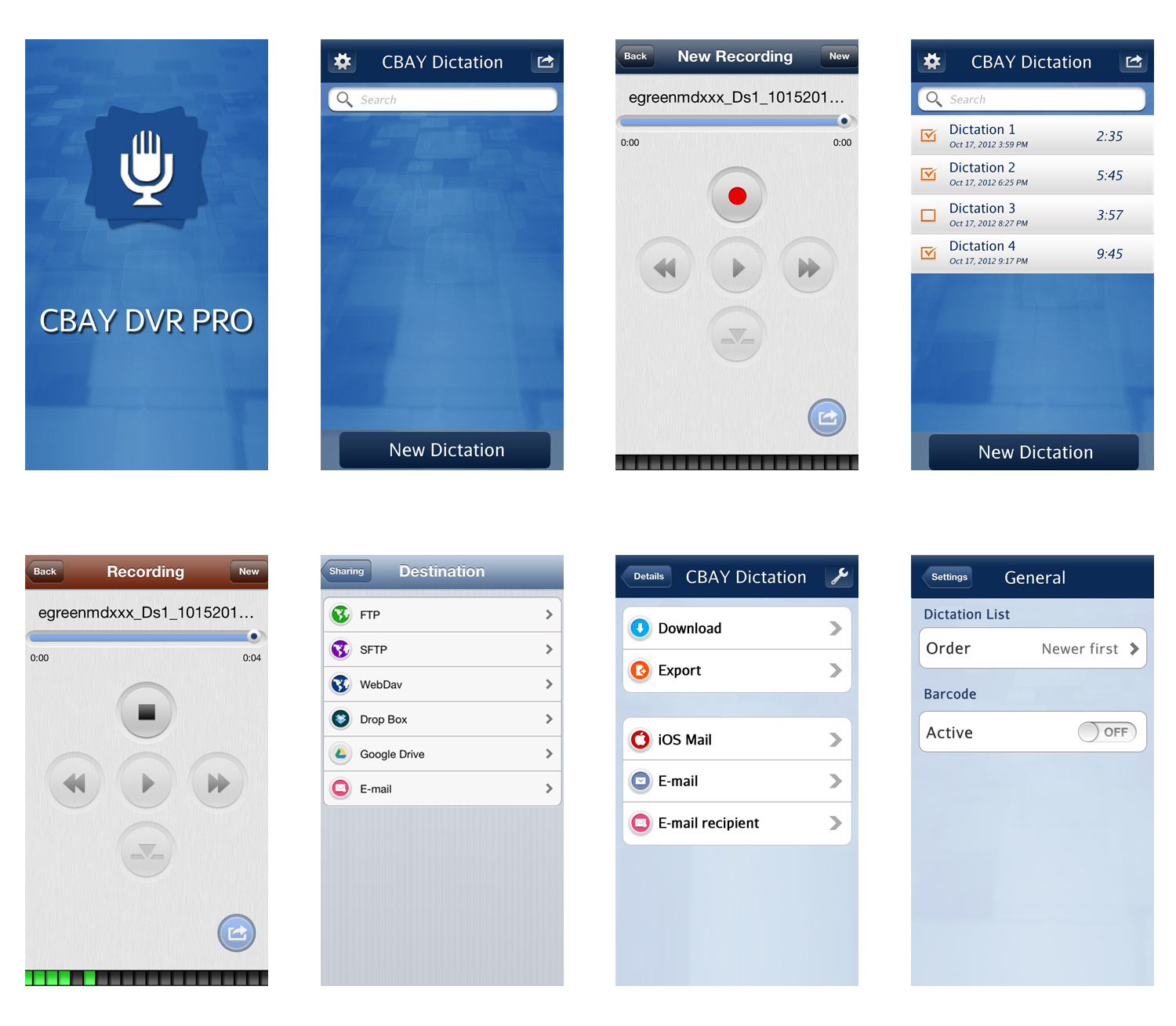
- Splash Screen: Clean & branded launch experience
- List Screen: Recording library with one-tap dictation button
- Play Screen: Full playback controls with visual feedback
- Share Screen: Secure export to cloud and email services
- Settings Screen: Customizable dictation order and barcode activation
Each screen was designed in Adobe Photoshop with a focus on clarity, accessibility, and professional trust.
Design Deliverables
All visual designs were created in Adobe Photoshop, with layered PSDs handed off to the development team for implementation.
Tools & Methods
🎨 Adobe Photoshop
🧠 Visual Design
📱 UI Mockups
🤝 Developer Handoff
📐 iOS Guidelines
What I Learned
Designing a secure, voice-first app reinforced that trust is built through clarity. Even without modern prototyping tools, intentional visual design can create confident, accessible user experiences.